
Contacts Sync - Sync Outlook Contacts with Gmail Contacts
| 06-April-2020 New - Contacts Sync V6 with new Google Sign-in. Download from the link below |
 |
- Calendar Sync for Outlook and Google. Sync Outlook Calendar with Google Calendar. 1-way, 2-way Google and Outlook Calendar Sync. Freeware. Visit Calendar Sync page for feature list, screenshot and download. Option to sync only upcoming Outlook appointments / Google Calendar events, choose a date range to sync - From dd/mm/yy To All or To dd/mm/yy, option to skip reminders/notification, attendees, description. Sync multiple calendars, sync categories/colors. |
Download Registry Fix to fix the message "browser not supported" during Sign-in. This registry fix will only enable Contacts Sync to use newer browser version - either your default browser or installed version of Internet Explorer (IE). Download Registry Fix
How to Download this fix: Right click on the above link and select "Save link as" and save and double click the downloaded file to run it. Then restart Contacts Sync and Signin. New users need not download this registry fix. Have Signin issues ? - see Support page.
New version of Contacts Sync Pro - Option to "Skip Private Contacts".
| Buy & Download Contacts Sync Pro 2 way sync | Contacts Sync Free (NEW v6) | |
 |

v6 (Installer || Portable) |
After making payment, download the installer or the Portable version of Contacts Sync Pro. Portable version can be installed on a computer without administrator privileges.
Contacts Sync is a FREE software to synchronize contacts
between Outlook and Gmail.  Featured in "CNET How To"
- Contacts Sync works with any Gmail account as well as Google Apps account.
- Synchronize from Outlook contacts to Gmail contacts or Sync contacts from Gmail to Outlook contacts.
- Option to choose a Outlook Contacts folder to sync.
- Retrieves all contacts from Gmail, including "Other Contacts" / "All Contacts" folders
- Sync Outlook Contacts with Gmail Use your Outlook contacts from anywhere in the world with your Gmail account.
- Transfer Gmail contacts to Outlook and use Gmail Contacts Offline.
- Scheduled Sync with an option to specify time interval between each sync, direction of sync and Outlook folder.
- Sync Contact Notes, Webpage, Job Title, Company Name, Name Prefix/Suffix, Email, Business/Home Phone/Fax and more.
- Sync even when there is - No Email but only FirstName, Only Email without any First/Last name and even only Company Name.
- Realtime sync status display in the form of balloon tips in windows notification area.
- Runs in system tray, Option to add a shortcut in Windows Startup folder.
- Outlook versions supported: (both 32 bit and 64 bit) Outlook 2003, Outlook 2007, Outlook 2010, Outlook 2013
- Users of Android Phones, iPhones, Tablets, Blackberry Playbook can use Contacts Sync to transfer Outlook Contacts to Gmail and then sync your phone with Gmail contacts.
- Now Available! -
New version of Pro - Skip Private Contacts,
Preview Sync - Export entire Contact list (both Outlook & Gmail
with Last Changed date/time) as a single CSV file, Once a day sync
schedule option, Skip a Outlook Category. Only $25.00
- 2-way sync and merge. Contacts in Outlook and Gmail will be synchronized and merged
- Options for Contact Deletion - Outlook or Gmail as master or deletion in both way.
- Sync more Contact fields including Phone(Other), Mobile-2, Address (Other), birthday, anniversary, spouse, profile url, company phone.
- Sync Outlook distribution lists with Gmail Contact groups.
- Option to choose which source will be the master for sync - Outlook or Gmail
- Option to copy the Outlook contacts to Gmail's "My Contacts" so that your contacts are easily seen in your mobile phone, tablet, playbook.
- Sync 2-way by Last modified. Any contact which has been recently modifed in Gmail or Outlook will take priority when updating the info in the contacts. So, you don't have to worry about specifying the direction of sync and keep modifiying the contacts in both Gmail & Outlook and all your Contacts will be sync.
- Buy Pro version for 2-way sync and to automatically sync Outlook Categories (to Gmail Groups) and to sync Contact Pictures.
- Plus all other options available in Freeware version. See below for complete feature list.
-
Pay and Download Pro instantly
DOWNLOAD Contacts Sync (FREEWARE version only)
Contacts Sync is now available only in 2 versions - Freeware and Pro. Click here to Compare features.
Due to changes in Google authentication method (OAuth1 to OAuth2),
older Contacts Sync Pro versions (1.x/2.x) stopped working after April
20th, 2015.
Please download Pro version 4.2
. Older Contacts Sync Free versions (v3.x/4.x) will not work after April
20th, 2015..
Changelog: Contacts Sync V6 (free)
New Google Signin - you will no longer see Javascript errors during signin
Changelog: Contacts Sync V5 (free) - Google OAuth2 sign-in support as recommended by Google. Older Contacts
Sync versions will no longer work. There will an one-time sign-in prompt
asking for user's consent. You will be only authorizing the app installed
on your computer to access your contacts.
- Profile 2 tab moved to new tab "Config for Profile 2"
- "Configuration 2" tab additions - Google OAuth Login code
(optional), Paste code box for manual sign-in. If you have trouble with
sign-in, see Support
/ FAQ page. Getting this Error: Can't fetch Gmail Contacts.
Check Network Connection.? See Support
page for solution.
- 15-Sep-2016 - Contacts Sync V5a
(FREEWARE) . Supports Outlook 2016. Works on Windows
10- If any issues, Download/install
.NET Framework 3.5
Download Contacts Sync V6 (Installer) 732 KB
Download Contacts Sync V6 (Portable) (.zip) Just download and Extract.
This version is recommended for users who do not have admin access
- If you see any errors please refer to Help file, read Support and FAQ page and/or email us. How to avoid Outlook Security Warning.
- Buy Pro version for 2-way sync, to automatically sync Outlook Categories (to Gmail Groups) and Contact Pictures and to add to Gmail's "My Contacts".
- More Apps for Gmail/Google accounts:
- Download Calendar Sync for Outlook and Google Free & Pro versions. (*** New version released *** )
- Easy Contacts Delete for Gmail - Delete Gmail contacts and groups at once. Bulk delete your Gmail contact list in a single click. (Free)
- Contacts Sort for Gmail - Google Sheets-on, Chrome App and Extension. Download Free Contacts Sort for your Gmail Contacts - a Chrome browser extension to sort your Gmail contacts in different ways - sort gmail contacts by date added or changed, sort by contacts with pictures, view contacts added/modified before and after a date, download sorted contacts as CSV and more...
| Customer Testimonials |
"Excellent customer service puts a sterling finish on
the face of your company!" - Brian Bass |
Contacts Sync Pro 2-way Sync version US$25.00 Click "Buy Now" to buy Pro 2way. Free Upgrades.
- New Features in Pro:
- Skip Private Contacts
- Preview Sync with "Preview Contacts" tab- Preview the action (add/update/del) before doing the actual sync. Name, Email, Organisation Name, Last Modified date/time and source of the contact (Outlook or Gmail) can be viewed. Status column will show the action that will be taken at the destination. You can sort by any column and Export entire Contact list (both Outlook & Gmail Contacts on a single screen) as a single CSV file.
- Skip a Outlook Category for contacts sync. (requires Outlook 2007 or later versions)
- Set once a day sync schedule. You can now schedule a daily sync at a particular time of the day.
- 2-way sync and merge. Contacts in Outlook and Gmail will be synchronized and merged
- Options for Contact Deletion - Outlook or Gmail as master or deletion in both way.
- Sync more Contact fields including Phone(Other), Mobile-2, Address(Other), birthday, anniversary, spouse, profile url, company phone.
- Proxy Support
- Option to choose which source will be the master for merging - Outlook or Gmail
- Option to copy the contacts to Gmail's "My Contacts" so that your contacts are easily seen in your mobile phone, tablet, playbook.
- Sync 2-way by Last modified option. Any contact which has been recently modifed in Gmail or Outlook will take priority when updating the info in the contacts. So, you don't have to worry about specifying the direction of sync and keep modifiying the contacts in both Gmail & Outlook and all your Contacts will be sync.
- Sync Outlook Categories to Gmail Contacts Group automatically. Gmail Contacts Group created automatically using Outlook Category name. In Gmail-to-Outlook direction, Gmail Contact Groups are matched to Outlook Categories.
- Transfers Outlook & Gmail Contact Pictures
- Option to choose whether to delete the Gmail Contacts which are not in Outlook Contacts - Outlook to Gmail direction only.
- Scheduled Sync option for automatic synchronization of Contacts.
- Plus all other options available in Freeware version mentioned above.
-
Pay and Download Pro instantly
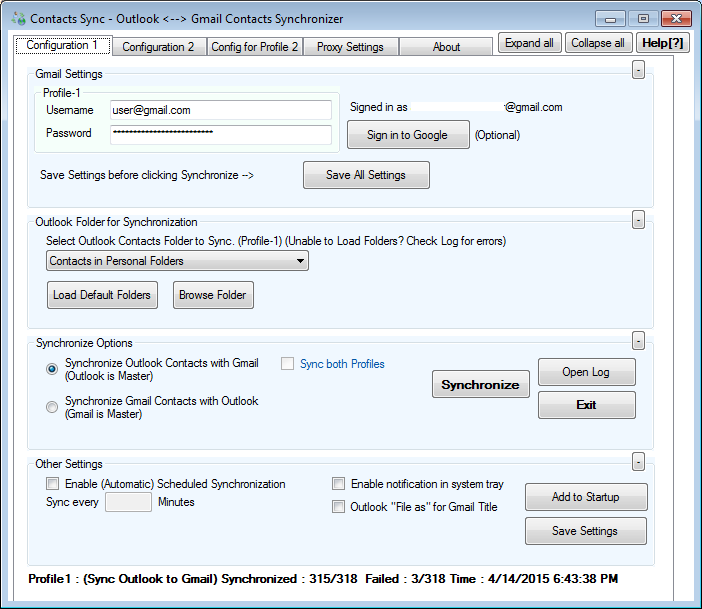
Contacts Sync Screenshot (Freeware version)
 |
Troubleshooting | For Technical Support / Feedback / Wishlist / Customization, send an email to support@pppindia.com
Support and FAQ